 Unreal Cloud Docs
Build Lifecycle
Every status a build moves through, from queued to passed, failed, or canceled.
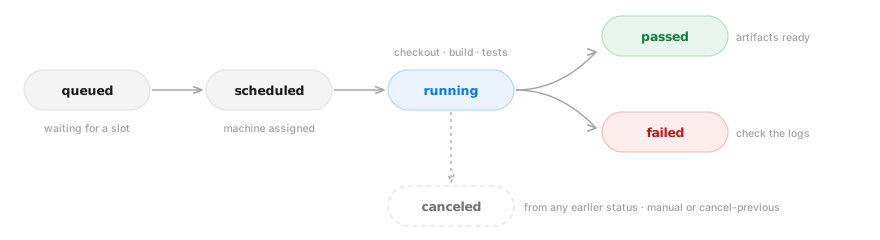
Every build runs on a dedicated, freshly provisioned cloud machine and moves through a series of statuses from creation to completion.
Statuses
| Status | Meaning |
|---|---|
queued | The build was created and is waiting for a machine and a concurrency slot. |
scheduled | A machine has been assigned and is being prepared. |
running | The machine is checking out your repository, compiling, packaging, and running tests if enabled. |
passed | Everything succeeded. Artifacts are available for download. |
failed | A step failed — check the logs. |
canceled | Canceled manually or by a newer build (cancel-previous). |
passed, failed, and canceled are final; a build can be canceled from any earlier status. The build page shows the full transition history, so you can see when each phase started and how long it took.
Logs
Open a build to view its logs, split into checkout logs (repository clone) and build logs (compile, cook, package, tests). Logs stream live while the build runs.
Artifacts
A passing build uploads its packaged output as one or more artifacts. Download them from the build's row menu in the Builds table. Each artifact lists its size and checksums (MD5, CRC32C) so you can verify downloads.
Artifacts are retained for 30 days after the build finishes, then automatically and permanently deleted. They also count toward storage usage while stored, and are removed sooner if you delete the build. Download anything you need to keep before the 30-day window closes.
Billable time and size
Each finished build records its billable compute time and artifact size. These feed the compute and storage meters described in Usage.